I have a lot of Bible material that I cannot search together. Sermon recordings turned into text. A commentary that I scanned page by page. A few Bible translations. Each one has its own search, or no search at all. When I wonder “what did the Bible and the preachers say about this?”, I open four things and read.
So I built one box where I type a question, and it answers using all of them, with a number after every claim that points to the exact source.
The Need: One Question, All My Sources
Here is a question I really asked: what is the difference between “the kingdom of God” and “the kingdom of heaven” in Matthew 3:2?
A normal search gives me a list of files. A chat AI gives me a smooth answer that I cannot check. I wanted a third thing: an answer that says “this sentence comes from this sermon at this minute, and this verse comes from this translation.”
The Proof: What It Looks Like Today
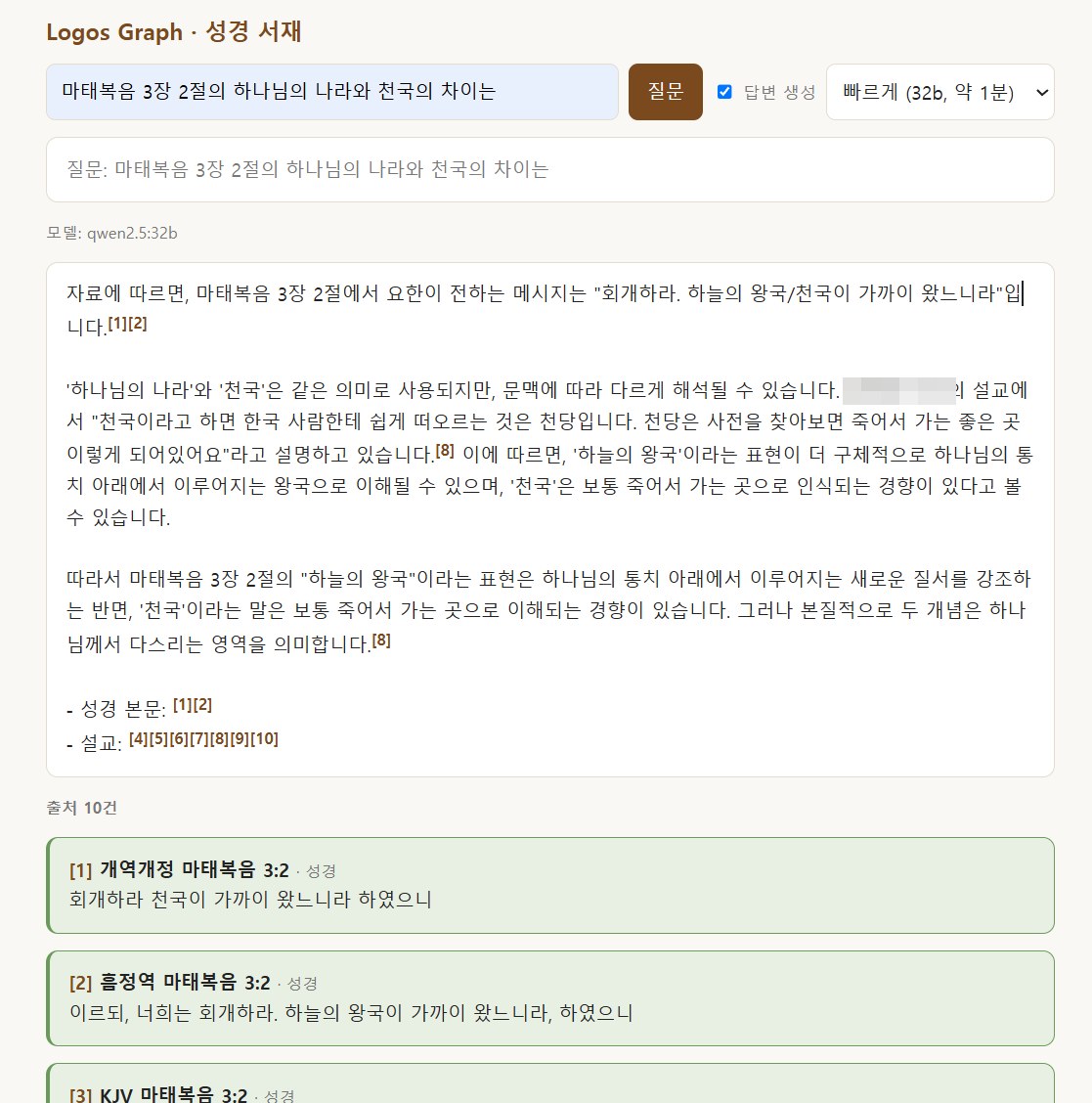
The answer page. One name is blurred on purpose. The green cards below are Bible verses; amber cards are commentary; blue cards are sermons.
What you see in the picture:
- The answer is written by a local Qwen model, and each claim has a small number like [1] or [8].
- Under the answer, each number has a card. [1] is the verse in a modern Korean translation, [2] is the same verse in a Korean translation of the KJV, [3] is the KJV itself. Sermon cards show the title and the time in the recording.
- Verse cards are shown first because the question names a verse. Sermon and commentary cards fill the rest.
What is inside the library right now:
| Source | Amount |
|---|---|
| Sermon transcripts (two speakers) | 7,114 chunks of about 700 characters |
| Commentary on a book of the Bible (scanned) | 639 chunks |
| Bible text | 93,292 verses (31,088 in a modern Korean translation, 62,204 in two more versions) |
| Embeddings | all chunks done |
Speed: with the 32-billion-parameter Qwen, an answer with 14 sources takes about 65 seconds. The 72-billion one took 274 seconds for the same question, about four times slower. I made the 32B the default and left the big one as a drop-down choice.
I like this more than I expected. Using it, it feels like a good way to keep my own knowledge and use it again. Now an old sermon I forgot is one question away.
The Story: Why Build It Myself
My sermon archives grow every week. The first speaker’s archive has almost 300 recordings. The second has about 185. I already had searchable transcripts for them, but “search” meant finding the same word. I wanted to ask about an idea.
I did not want to use LightRAG or a graph database. I wanted something I could read in one evening and fix myself. So the whole thing is one SQLite file and a few hundred lines of Python.
Two things went wrong, and both taught me something.
The “no data” answer. I asked about a topic I knew was in the second speaker’s sermons. The answer said there was no data. I noticed that none of my answers had ever used that speaker. When I checked, only one file of that archive had been loaded. The real set was on my NAS, 185 files. I had not shown the count per source, so nothing looked wrong.
💬 Prompt that worked (2026-10-16 20:50) “There is a sermon about white hair in the second speaker’s archive. I asked ‘In the Bible, does a person with white hair mean someone under God’s rule?’ and it says there is no data. Nothing has been answered from that archive so far. Was that source added at all?”
That question was the whole diagnosis. I did not say “fix it”. I asked whether the source was there, and that made me count.
🗂 Claude.md Rule When an answer says “no data”, count the loaded files per source first. A source that never appears in any answer is probably not loaded.
The tunnel that was not mine. The model runs on a GPU box that I borrow. My PC reaches it through an SSH tunnel on the default Ollama port. One day the web page said 404 … /api/embed. The reason: the Ollama desktop app on my own PC had started and taken that port. My page was asking a small local model that has no embedding model at all. I think it had worked for several days because an older tunnel was still alive on that port. After that tunnel died, the page quietly talked to the wrong Ollama.
The How: Build, Cost, Open Problems
Layout
Data and code stay on my PC. The GPU box only does the calculation. It stores nothing of mine.
chunks          text + source + where it is (time or page)
verses          every verse, per translation
verse_edges     chunk → verses it mentions
concepts / chunk_concepts / relations   topics the model extracts
Embeddings are stored as float32 blobs in SQLite and compared with plain cosine similarity in NumPy. For 7,753 chunks that is fast enough that I do not need a vector database.
Two kinds of links
- Verse links. A regular expression finds references like “Matthew 3:2” or “chapter 3, verse 2” in each chunk. The model is not involved, so it cannot invent a verse. This part is solid.
- Concept links. Qwen reads three chunks at a time and lists up to six concepts and relations such as foreshadows or fulfills. I keep a relation only if both ends are concepts from that group or real verse references.
The second part is barely built. I ran it on 8 chunks: 16 concepts, 0 relations. A full run is about 30 seconds per group and roughly 1,100 groups, so about 9 hours on the 32B model. I have not started it. Today’s answers come from verse links plus vector search, which already works well.
How a question is answered
- Find verses in the question and fetch them in every translation.
- Add chunks that link to those verses.
- Add the nearest chunks by embedding (the
bge-m3model). - Limit each source type to half of the slots, so sermons cannot push the Bible out.
- Ask Qwen to answer only from these, using
[n]after each claim.
Keeping the tunnel alive
This is the script that fixed the “wrong Ollama” problem. It keeps the tunnel on its own port and reconnects.
while ($true) {
    ssh -N -L 11435:localhost:11434 <gpu-box> `
        -o BatchMode=yes -o ExitOnForwardFailure=yes `
        -o ServerAliveInterval=30 -o ServerAliveCountMax=3 -o ConnectTimeout=15
    Start-Sleep -Seconds 10
}
ServerAliveInterval and ServerAliveCountMax notice a dead link in about 90 seconds. ExitOnForwardFailure makes the loop retry if the port is busy. Then I registered two Windows Task Scheduler jobs that start at logon: one for this loop and one for the web page. I changed the app default to the new port, and I made the error message say “GPU box not reachable, check the tunnel” instead of a bare 404.
When an old tunnel from another session was still holding the port, I stopped it. The loop took over in about 25 seconds. I have not yet seen the jobs start by themselves after a reboot.
🗂 Claude.md Rule Do not use the default Ollama port for a remote tunnel on a PC that also runs the desktop Ollama app. Pin the tunnel to its own port and make the app fail loudly when it cannot reach it.
The scanned book: still unsolved
My commentary was a Korean book that I scanned. A tool made it a searchable PDF, but the text has broken spaces and wrong characters. The PDF search finds almost nothing. My semantic search copes better, but it also loses verse references like “(4, 5절)” when the characters are wrong.
💬 Prompt that worked (2026-10-17 08:04) “Shouldn’t we look for a more careful way to turn the scans into text? I think making it again is better than correcting it. And I will keep scanning books from now on.”
That changed the plan from “clean the old text” to “read the images again with a better reader.” I tried three readers on five pages:
| Reader | Time per page | What I saw |
|---|---|---|
| Local vision model (Qwen2.5-VL 32B) | 46–80 s | Spacing correct, header and page number correct. I compared with the original PDF: about one wrong character per page. |
| PaddleOCR on CPU | about 85 s | Characters good, but it drops the spaces. Slower than the vision model on this PC. |
| DeepSeek vision (experimental model), thinking off | 3.5–6.3 s | Fast, but about 3–5 wrong characters per page by my rough count |
The local vision model is the best reader, but 400 pages for one book would take about 7 hours. That is too long for me, and I plan to scan more books.
What I tried to speed it up:
- Smaller images: no gain. Only about 6 seconds of a 58-second page is spent looking at the image. The rest is the model writing the text, at about 10 tokens per second.
- Sending 3 pages at once: no gain. The server handles one request at a time, and it is not my server to change.
- DeepSeek with “thinking” on: 14–19 s per page, and on two of five pages the model used its whole output limit on thinking and the text was cut. Turning thinking off fixed that.
- Telling DeepSeek that the page is from a Bible commentary: a small help (it stopped turning one proper name into a common word), but it did not change the total much.
- Reading the page in two halves at full resolution, or adding a second “check your work” pass: no gain. The counts stayed at 40–43 differences over five pages.
Also an honest limit: my “differences” number compares DeepSeek with the local model, not with a perfect answer. Part of the difference is the local model’s own mistakes, and part is punctuation. I do not yet have a hand-checked set of pages to measure with. The next step is to mark the real errors on those five pages, or to try another vision model.
I did not re-read the whole book. The 639 commentary chunks in the library still come from the old text.
Cost
- The GPU box is borrowed, so compute is $0 for me. Everything else runs on my PC.
- The DeepSeek test was five pages: about 1,150 input tokens and 450 output tokens per page. I have not looked at the bill, but it is a few thousand tokens, so I expect a very small amount. Reading a whole book that way would be about 460K input and 180K output tokens. I have not priced that.
- Claude Code is on my existing subscription, with nothing extra.
What is still open
- Concept and relation extraction for the whole library (about 9 hours, not started).
- Re-reading the scanned book with a reader I trust.
- Verses written as spoken numbers (“chapter ten, verse twenty-six”) are not recognized by the regular expression.
- Different words for the same concept are not merged yet.
- Auto-start after a reboot is set up but not yet seen working.
If you try something like this, my two suggestions are small: show the number of loaded items per source on the page, and keep the model and its port in one setting, so that a failure says what is missing.