My wife has a habit I love.
Every morning, before the day starts, she listens to a Bible teacher she has followed for years. It’s not the Sunday message from our church. It’s something quieter and more personal — a set of recordings she comes back to again and again. They calm her.
There was one problem. To listen, she had to open the file manager on her phone, scroll through a long list of audio files with odd names, and tap the right one from memory. No order. No search. No “play the next one.” If she wanted a certain teaching, she usually couldn’t find it.
I watched her do this for months. One day I thought I might be able to fix it. So I tried, and it became the first app I ever built.
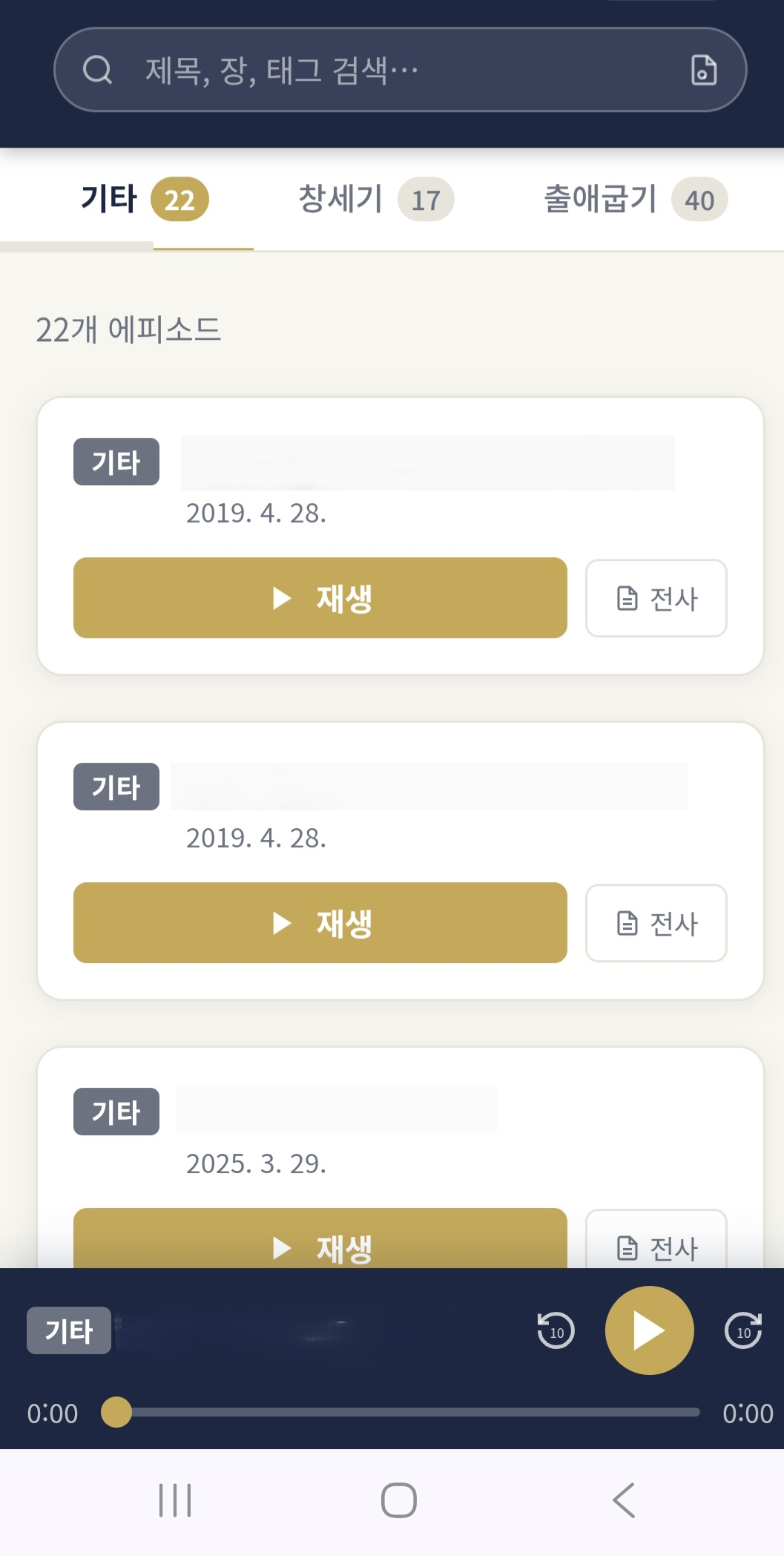
It’s nothing fancy: her recordings, in one place, in order, easy to search, opening from an icon on her phone. It runs on a small box in our home, and it costs nothing each month.
I’m sixty. I split my time between the city and my family’s farm by the Boseong River, in the Korean countryside, and I have no background in coding. If I could make this, I think a lot of people could. Here’s what it does and why it mattered to me.
What the App Actually Does
She opens it on her phone like any other app. It runs in a browser from our home NAS, and it holds only the recordings she has collected over the years:
- One clean list, in order. No more scrolling through file names. The teachings are listed properly, with titles she can read.
- It remembers where she stopped. Tap a teaching, and it starts again where she left off. No hunting for the right spot in a 90-minute file.
- Continuous play. When one teaching ends, the next one starts. She can get through a morning of exercise or a commute without touching the phone.
- Search. This is the part she didn’t know she wanted. She types a word and finds every teaching that mentions it. (More on how that works in a later post. It became the feature I use most.)
It’s not clever. It just does what she needs, and not much else.
Why It Started: A Morning Habit
I should be honest about how I came to faith. My wife led me there. She’s the deeper Christian of the two of us — the steady, quiet kind — and I followed her into it.
The teacher she listens to is an elderly man, now eighty. He has spent his life studying and explaining the Bible. I won’t name him or say where he teaches; this is private, and I want to keep it that way. But I’ll tell you the kind of man he is. He once said you shouldn’t walk out your front door in the morning before you read the Bible. He gives people their daily bread, every day, and asks nothing back.
For a long time his recordings were my wife’s thing, not mine. Then one morning I put them on while I exercised, and kept them on through my commute — an hour, sometimes two. By the end of the week I understood why she loved them. And I felt something I didn’t expect: I was grateful to a man I’d never really met, who had quietly shaped my wife’s mornings for years.
That feeling turned a small convenience into something bigger. But that’s a story for the next posts in this series.
My First Time Opening Claude Code
Here’s the part that still surprises me.
I’d heard about AI coding tools for a long time — mostly from my older brother, who is a real expert and never stops telling me about the newest thing. I’d even used one at work once. But I’d never opened Claude Code. I kept meaning to.
Building this player is what finally pushed me. I sat down, described what I wanted, pointed it at an example to follow, and within a day I had something that worked. It wasn’t polished — the search and the small fixes took days and weeks of daily use after that. But the core of it, the part my wife could actually open and use, came together in one afternoon.
I’ll get into how that’s possible for a non-coder in the next post. For now I’ll just say this: the gap between “I wish this existed” and “this exists” is smaller than it used to be.
How It Runs for $0 Per Month
Here’s the plain, non-expert version.
Hardware. Everything runs on a small, quiet box in my home — a Synology DS224+ NAS. No rented servers, no cloud bills. It’s the same machine that runs the other apps I’ve built for my family.
The plumbing. A web server (Nginx) serves the app, and Cloudflare Tunnel gives it a secure HTTPS address with no port forwarding and no static IP. So my wife can reach it from anywhere on Wi-Fi. (I’ll come back to that tunnel in a later post.)
On her phone. It’s installed as a PWA — a home screen icon that opens full-screen, like a normal app. No app store, no review, no fee.
Just for us. A new device asks for a password once. This isn’t a public service. It’s a private family app, on purpose.
So the running total:
- Hosting: $0 — it lives on our NAS.
- The app: $0 — I didn’t buy it; I built it with AI.
- Monthly fees: $0 — no company in the middle.
One word of caution before you picture building your own. Think of this app as an empty shelf. What you put on it is up to you, and it should be recordings you made yourself, or content you legally own and keep for personal use. The player is the furniture; what fills it is yours.
This Was Only the Beginning
I thought I was building a small convenience for my wife. It didn’t stay small.
That gratitude I mentioned — toward an eighty-year-old man giving people their daily bread — turned into a project. I took everything he has taught, put it on a cheap little tablet, transcribed every word so it can be read as well as heard, and handed it to him as a kind of inheritance. His own teaching, in his hands, on his own domain.
That’s what this series is about. This first app, built for my wife in a day, was just where it started.
If you’d like to follow along, please subscribe. The next post is about my brother, a farm by the river, and why — in the age of AI — just knowing a technology exists turns out to be most of the work.
Key Takeaways
- You don’t need to be a developer to turn a messy folder of audio into a real, searchable app.
- A small home NAS can run private family apps you use every day for $0/month.
- Installed as a PWA, a web app gets its own home screen icon — no app store needed.
- Load it only with recordings you made or legally own. The player is yours, and so is what fills it.
- The gap between “I wish this existed” and “this exists” is smaller than it used to be.