Every parent knows this feeling.
You hand your child a tablet to show them one video you picked. One tap later, the app has carried them off somewhere else — loud videos, ads, and “recommended” clips chosen by an algorithm that doesn’t know or care about your child.
I didn’t want that for my daughter. I also didn’t want to pay a monthly fee, make another account, or hand my child’s attention to another company.
So I built my own.
It’s her player. It holds only what I put in it, it plays on repeat for as long as she wants, and it opens from its own icon on her phone and tablet. It runs for $0 a month. No ads, no algorithm, no way out.
I’m sixty years old. I split my time between the city and my farm by the Boseong River, in the Korean countryside, and I know nothing about coding. If I could build this, I’m fairly sure you could too. In this post I’ll show you what I made and how it came about.
What the App Actually Does
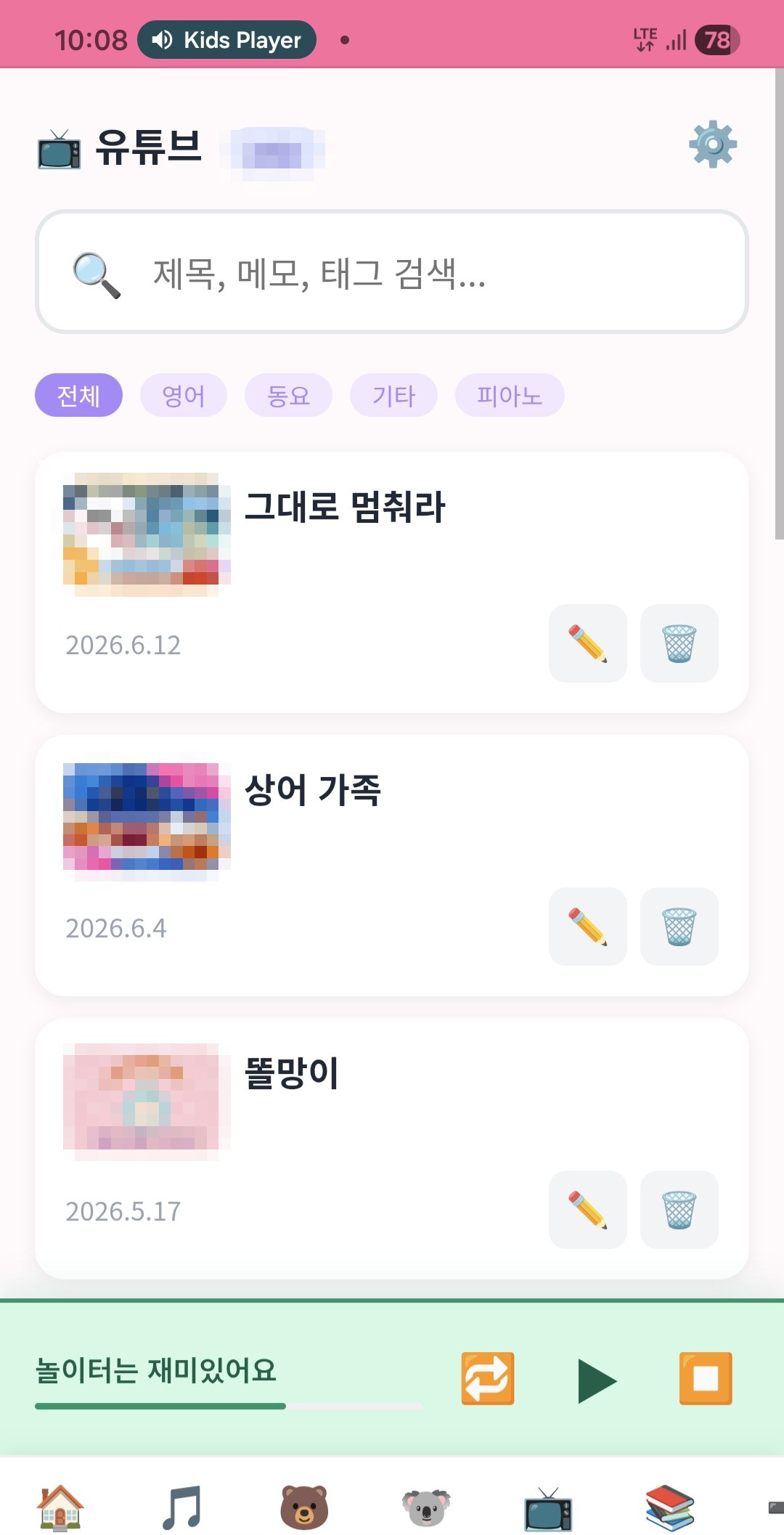
My daughter opens it on her tablet like any other app. It runs in a normal browser from our home NAS, and it holds only what I’ve put there:
- Audio and video files I own
- Audio from children’s book sets (often stuck on CDs, or locked to certain devices)
- YouTube videos I’ve picked myself
Here’s how it’s different from just opening YouTube:
- YouTube that doesn’t run away. The videos I’ve saved play inside the app. Tap one, and it plays right there. No jump to the YouTube app, no home feed, no algorithm pulling my daughter somewhere new. (A few clips from the same channel might show up after one ends, but never an endless feed built to pull her away.)
- Repeat, repeat, repeat. Young children want the same song ten times in a row. The YouTube player makes that surprisingly hard. In my player, one tap sets it to repeat as many times as she likes.
- Its own library per device. My daughter’s tablet and my phone each remember their own history and lists. No profiles to set up, no logging in. (If you do want to share YouTube lists across the family, you just use the same group name.)
The point isn’t that it’s fancy. The point is that I decide what goes in, and it never changes without me knowing.
It Keeps Getting Better Because We Use It Every Day
This is where a home-built app beats an off-the-shelf one. Because my daughter and I use it every day, I keep fixing the small annoyances:
- I added a repeat function for my daughter, who loves hearing the same episode over and over. It’s been very handy.
- When she wanted to watch a few stories back to back, I added continuous play.
- When tapping a video sometimes launched the YouTube app, I trapped YouTube inside the player.
None of these came from a roadmap. They came from real evenings on the sofa.
Why a Sixty-Year-Old Dad Built This
I became a father later in life. My daughter is three, and like a lot of parents today, I worried about screen time.
The turning point was small but clear. One evening, my daughter tapped a calm YouTube video I’d chosen. The YouTube app opened, and within seconds the algorithm had pulled her somewhere else. She wasn’t watching what I’d picked anymore. She was watching what a machine had picked to keep her staring.
There were smaller frustrations too, the kind only parents of young children know. My daughter wanted the same song over and over, and the YouTube player fought me every time I tried to set it on repeat.
That night I decided it was better to build something myself than to keep fighting. A few days later, my daughter’s videos played inside my app, repeated as often as she wanted, with no feed left to pull her away.
I’m no engineer. For most of my life, words like “server” sounded like something only young professionals dealt with. But I had a small NAS at home, and a new kind of helper: AI — one you just talk to. So instead of taking what the big platforms offered, I made something small and honest, just for my family.
It changed how I see technology. For the first time, the tools in our home work the way I want, not the way a company decides is best for its ad revenue.
How It Runs for $0 Per Month
Here’s the honest, non-expert breakdown.
Hardware. Everything runs on a small, quiet box in my home: a Synology DS224+. No rented servers, no cloud fees. I put in two Synology 4TB drives. One holds everything, and the other quietly mirrors it as a backup. So if a drive ever fails, we won’t lose our memories.
Here’s the total one-time cost. After that, nothing:
| Item | Cost |
|---|---|
| Synology DS224+ + two 4TB drives (one mirrored for backup) | Approx. $600 (₩800,000) |
| Every month after that | $0 |
(This is what I paid in Korea. Prices vary by region and over time, so check current prices before buying.)
The plumbing. Three small parts work together: a web server (Nginx), the app itself (a light Node.js program), and Cloudflare Tunnel. The tunnel is the quiet hero. It gives the app a secure HTTPS address with no port forwarding and no static IP, so it works from anywhere with Wi-Fi. (More on that tunnel in a later post.)
On my daughter’s tablet. It’s installed as a PWA — a home screen icon that opens full-screen, like a normal app. No app store, no review, no fee.
Just for our family. New devices only need a password entered once. This isn’t a public service. It’s a private family app, on purpose.
Costs.
- Hosting: $0 — it lives on my NAS.
- App: $0 — I didn’t buy it; I built it with AI.
- Monthly fees: $0 — no companies in between.
One caution before you rush to build your own. Think of this app as an empty shelf. What you put on it is up to you, and it should be files you made or content you legally own. The player is the furniture; the books are yours.
It’s Never “Finished”
I didn’t set out to build a finished product. I built something that grows a little each week, usually because my three-year-old daughter points out the next annoyance.
This is my favorite part. And the rest of this blog is that very story: a sixty-year-old beginner by the Boseong River, working with AI to fix and build our family’s digital life, one piece at a time. If you’d like to follow along, please subscribe.
Key Takeaways
- You don’t need to be a developer to replace YouTube Kids with something safer.
- A small home NAS can host a private, ad-free player your kids use daily for $0/month.
- By trapping YouTube inside your own app, you can take the algorithm out of the picture.
- The best features come from using the app daily and fixing its annoyances as you go.