In short
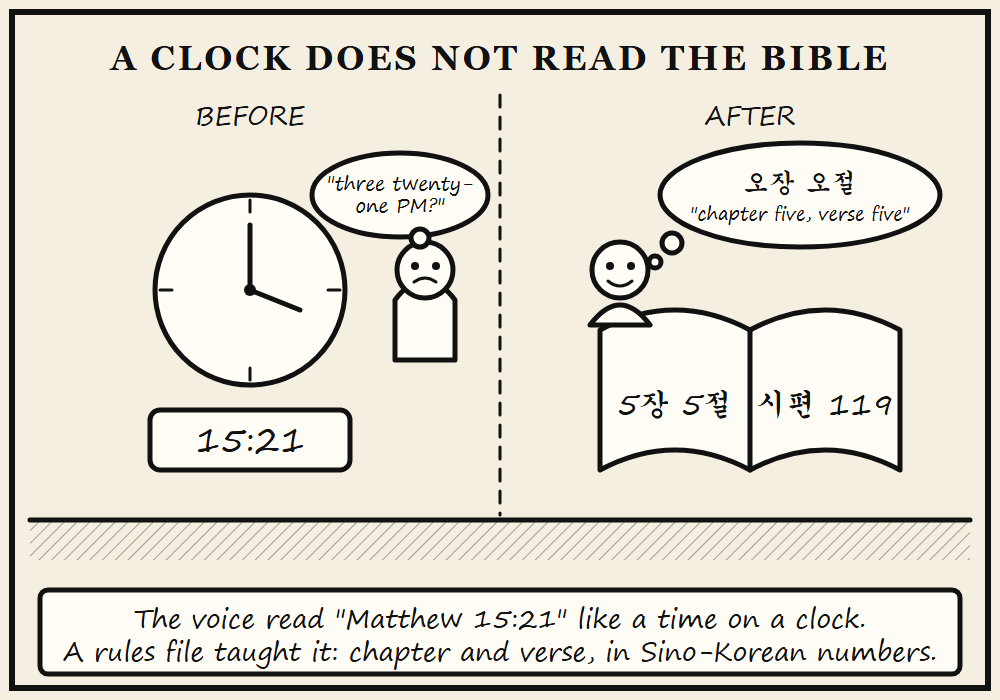
- My Korean dub of English talks had three small problems: the last sentence was sometimes cut off, “Matthew 15:21” was read like 3:21 in the afternoon, and some lines sounded stiff.
- I fixed the cut-off bug, added a reading rule (“chapter 5 verse 5” is read with Sino-Korean numbers, not “five”), gave the translator the neighboring lines, and added a second DeepSeek pass that polishes the whole script before the MP3 is made.
- After the change, the script I read was much cleaner. The second pass runs 30 lines at a time and falls back to the first translation if anything looks wrong.
- Cost: $0 for the voice and the NAS. The polish pass uses DeepSeek; I have not measured its cost yet.
The Need
I now listen to English talks in Korean every day. The pipeline is the one from my earlier posts: captions, a DeepSeek translation, and a Korean voice (the story so far). It worked well enough that small flaws started to stand out. They were small, but I heard them every day.
- The last sentence was cut off. Sometimes, when the video ended, the voice stopped in the middle of the last sentence.
- Verses sounded wrong. A sermon says “Matthew 15:21”, which means chapter 15, verse 21. The voice read it like a clock: fifteen, twenty-one. Even “5장 5절” (chapter 5, verse 5) came out with the native Korean numbers “다섯 장, 다섯 절”. Korean readers say these with Sino-Korean numbers: “오장 오절”.
- Some sentences were not polished. Each batch of 20 lines was translated alone, so a sentence that began in one line and ended in the next could sound broken.
The Proof
Three things changed in my daily use.
- The last sentence is read to the end, even after the video stops.
- Verses are read as chapter and verse. Psalms use the word for “psalm number” instead: “시편 119:1” is read “시편 백십구편 일절” (Psalm 119, verse 1).
- When I press “make a listen file”, the app first polishes the whole script. After the first run I read the polished script, and it was much cleaner. The voice file for that talk was already in my library when I came back.
I tested the verse converter on sample sentences before I used it on a real talk. I have not yet listened to a full sermon with all the new rules, so that is my next test.
The Story
I wrote this after listening for a while:
💬 Prompt that worked “I am listening to English content and it works well, but as you warned, the last sentence is sometimes cut off. Also ‘Matthew 15:21’ means chapter 15 verse 21, but it is read as 15:21 like a time. Some sentences are not polished. Is there a way to improve this, for example polishing with DeepSeek?”
Claude found a separate cause for each problem, and I will go through them in the next section. Then I added a request about rules:
💬 Prompt that worked “I will write detailed transcription rules from now on. Should they go in a separate md file? Please set it up. You already have my rule for ‘5:5’. Please add how to read chapter and verse numbers: 5장 must be ‘오장’ and 5절 must be ‘오절’, never ‘다섯 장’ or ‘다섯 절’.”
One more thing broke along the way. While the polish pass and the audio build were running, my phone screen turned off. When I turned it on, the page said “Failed to fetch”. The audio was fine; it had finished on the NAS. Only the progress check on the phone had failed. I fixed that too.
The How
1. The cut-off sentence. The player reports its state as a number. My code treated “playing” as the only state where the voice should run, so when the video ended (state 0), the voice was paused in the middle of a sentence and never resumed. Now the ended state counts as “keep reading”. The last unread lines are still read.
2. Reading rules in code. A small function in the NAS service runs on every sentence just before the voice is made.
- A Bible book name followed by
15:21becomes15장 21절. It only fires when a book name comes first, so a real time such as “3:21 in the afternoon” is not touched. I only listed full book names and abbreviations of two or more characters. One-character abbreviations clash with ordinary words, for example “시” is also the Korean word for “hour”. - Chapter and verse numbers are turned into Sino-Korean words by a short function: 5 becomes 오, 16 becomes 십육, 119 becomes 백십구. So “5장 5절” is read “오장 오절”.
- A bare “5장” is converted only if the same sentence has a book name or a word like “Bible”, “passage” or “verse”. Otherwise “종이 5장” (five sheets of paper) would be read wrongly.
Because the converter works on the text just before the voice is made, it also fixes translations I had saved earlier. Only the MP3 files already made need to be built again.
3. A rules file in one place. I put the rules in a Markdown file next to the web app (dubbing-rules.md). It has two parts.
- Instructions for the AI. Short lines such as “write verses as
15장 21절, never15:21” and “use standard Korean Bible book names”. The page loads this part and adds it to every DeepSeek prompt. Because it is a web file, I only copy it to the NAS. No rebuild is needed. - Reading rules. A table of examples for the voice, with the forbidden reading beside each (“five chapter” is forbidden). This part is handled by the code above. When I change it, I change the code and rebuild one container.
I keep the AI part short on purpose. It is sent with every request, so length costs money.
4. Better first translation. Each batch now carries two lines before it and two lines after it, marked as “context, do not translate”. The prompt also asks for fluent spoken Korean and one steady polite style.
5. The second pass. Just before the MP3 is built, the page sends the script back to DeepSeek 30 lines at a time, in order. For each line it sends the English source, the current Korean, and a length limit, plus the two lines before (already polished) and the two after.
The guard rails matter more than the prompt:
- A polished line is accepted only if it is not empty, contains Korean, and fits the length limit. Otherwise the first translation stays.
- If one request fails, only that block stays unpolished. The build goes on.
- The page remembers how many lines it polished for each video, so it does not pay for the same video twice.
- Only the changed lines are saved to the NAS, so the downloadable captions get the better text too.
6. “Failed to fetch” after the screen turned off. A phone browser cuts network requests when the screen sleeps. My progress check treated that as an error and stopped. The audio build lives on the NAS and does not care. I changed three things:
- the progress check retries instead of giving up, and shows “checking the connection… the NAS is still working”;
- when I open the video again, the page asks the NAS if a build is still running and continues to show progress;
- while a file is being made, the page asks the phone to keep the screen on (the Screen Wake Lock API). The translation and polishing run in the phone browser, so they stop if the phone sleeps.
I also fixed a small thing: pressing “listen-only” used to dim both buttons, so it looked as if both were pressed. Now only the pressed one dims.
🗂 Claude.md Rule Treat a video player’s “ended” state as part of “playing” for anything that reads aloud. If the voice follows the player and the video ends first, the last sentence is cut off.
🗂 Claude.md Rule Never fix a reading problem in the translation alone. Keep a small, deterministic “how to read this” function just before the voice, and write the rules in a file. Then old saved translations get fixed too.
🗂 Claude.md Rule A long job that has a phone page watching it must survive the phone sleeping. Retry the progress check, and let the page rejoin a build that is already running.
Cost: $0 for the voice (edge-tts), ffmpeg and the NAS. DeepSeek does the translation and the polish pass. I have not measured what the polish pass costs for one hour of video, so I will not give a number.
What I’ll try next
- Add more reading rules to the file as I hear them: the “편” in “시편 119편” is done, but dates, units and English names inside Korean sentences are not.
- Listen to a full sermon with the new rules, and compare the saved script before and after polishing.
- Move translation and polishing to the NAS so the phone can sleep from the start. The API key currently lives only in my phone’s browser, so this needs a safe way to keep it on the NAS.