In the same week, I bought two computers from the same company.
One was a Lenovo laptop — a nice everyday machine I picked up at Costco. The other was a Lenovo tablet, bought to be a small home server. They had the same 128 GB of storage. And the tablet cost less than a third of what the laptop did.
That gap made me stop and think. Not because the laptop was a bad deal — it wasn’t. But it showed me something I’d never really thought about. For the job of being a server, most of what you pay for in a “real” computer just sits there unused.
The short version: if all you need is a small box that stays on, stays connected, and runs a light program, a budget tablet isn’t much of a compromise. Same storage, a fraction of the price, a fraction of the power, and no noise.
I’m sixty, I don’t code, and I wouldn’t have worked this out on my own. As usual, my older brother pointed the way. Here are the receipts.
The Receipts
Here’s what I actually paid, side by side. (These are Korean prices in won. Dollar figures are converted at the May 2026 average rate of ₩1,487 per dollar. Check current prices where you are.)
| Lenovo K-10 (tablet) | Lenovo IdeaPad (laptop) | |
|---|---|---|
| Price | about $100 (₩150,000) | about $293 (₩435,000) |
| Storage | 128 GB | 128 GB |
| Bought to be | an always-on server | my everyday laptop |
| Power, running 24/7 | a few watts | many times more |
| Fan / noise | none | yes |
| Screen, keyboard, Windows license | (don’t need them) | (paying for them) |
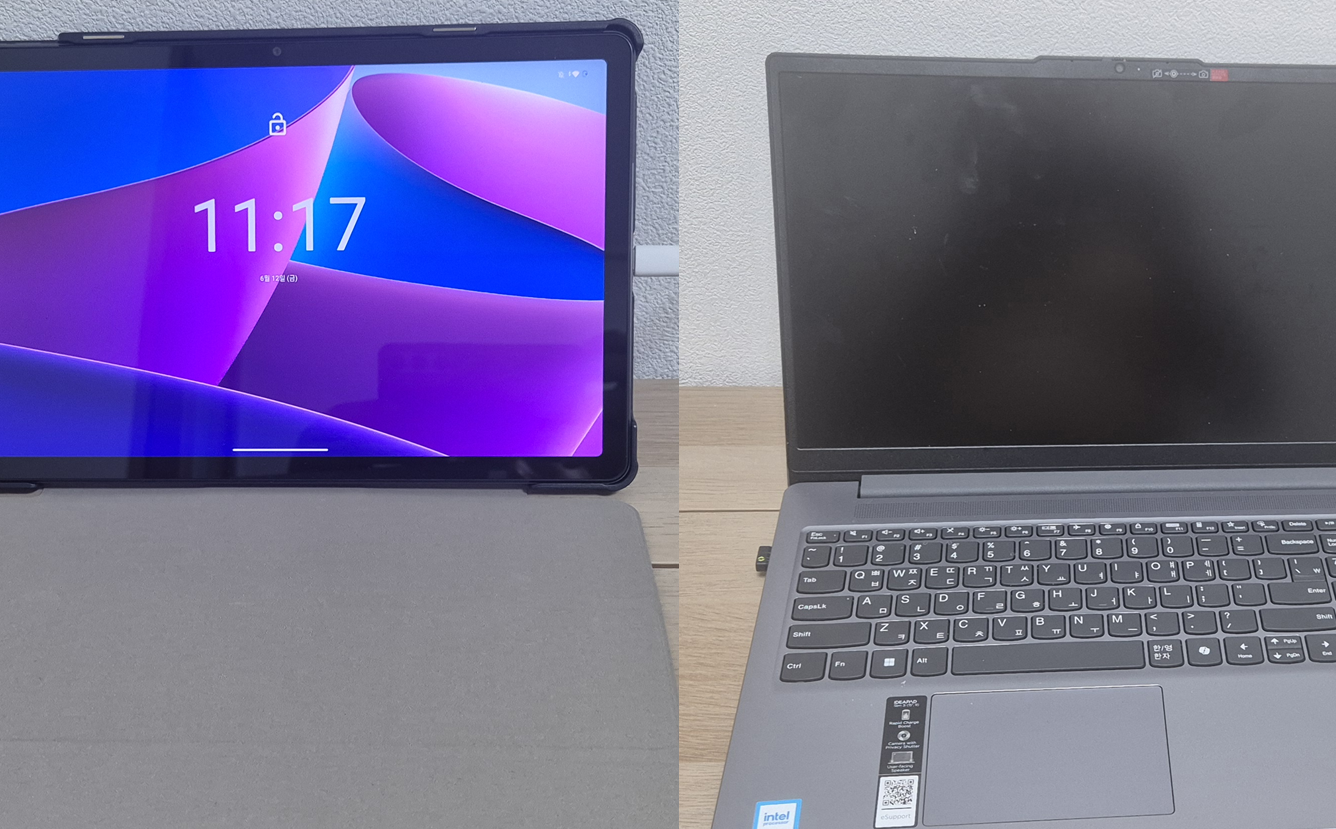
Look at that last row. When you buy a laptop, you pay for a screen, a keyboard, a trackpad, a battery made for carrying around, and usually a Windows license. A server that lives on a shelf and is reached over the network uses none of those. They sit there, costing money, doing nothing.
A tablet drops most of that and keeps what a small server actually needs: storage, memory, a processor, and a network connection — in a sealed, silent, low-power package.
The Buying Saga (and Why I Was in a Hurry)
The plan didn’t start with Lenovo at all.
When my brother first taught me to use a tablet as a server, he gave me a clear pick: a budget brand called BDF, the kind of cheap Android tablet you find on Amazon for around $57 (₩85,000). He builds these for schools, so he knows which cheap models hold up. I went to buy one.
Two problems. By April 2026 the price had drifted up to around $59, which was fine — but the shipping time was long. Weeks. And I was in a hurry, because this server wasn’t for me. I was building it as a gift, and I wanted it in his hands soon. (That’s the heart of this series, and it’s coming.)
So I looked for something I could get now. That’s when I found the Lenovo K-10: a name-brand tablet, 128 GB of storage, about $100 (₩150,000). For a known brand with that much storage, the price seemed almost too low.
And here’s the part that stuck with me. Just days earlier I’d bought that Lenovo IdeaPad laptop at Costco for about $293 — and it also had 128 GB of storage. Same company. Same storage number. One is a full laptop, the other a tablet costing less than a third as much. Seeing those two prices next to each other is what finally made the “tablet as server” idea click for me, in a way no explanation had.
To be fair to the laptop: it’s a genuinely good machine for the price. Its only real limit is that 128 GB is small for a laptop. As a daily computer it’s good value, and I don’t regret it. The point isn’t that the laptop is bad. It’s that, for the job of being a server, I’d have been paying for a screen and a keyboard I’d never look at.
The Always-On Math
Here’s the part that’s easy to forget when you grab an old laptop or build a desktop “server”: a server doesn’t run for an hour. It runs all the time. Every watt it uses, it uses 24 hours a day, 365 days a year.
This is where a tablet pays off. A tablet is made to last all day on a small battery, so it sips power by design. Left on as a server, it uses a few watts. The yearly power cost is small enough that I don’t think about it.
A laptop running with its lid open all day uses much more, runs its fan, and gets warm. Honestly, it just feels like something you shouldn’t be doing to it. A desktop tower is more again. None of that is a disaster, but it adds up, and it’s noise and heat in your home for years.
The tablet, by contrast, sits there quietly, the way your phone does on a nightstand. You forget it’s there. For a server, that’s what you want.
When a Tablet Is Not the Answer
I don’t want to oversell this, so let me be straight about the limits.
- Heavy work needs real hardware. If you’re running databases for a dozen users, transcoding video, or hosting something demanding, a tablet isn’t your machine. That’s what my NAS — a Synology DS224+ — is for, and it earns its keep running the apps my whole family uses.
- Storage can be tight. 128 GB is plenty for an audio library. It’s not much for a movie collection. Know what you’re storing.
- It’s a sealed box. You usually can’t open it up and add drives the way you can with a NAS or a desktop.
So the honest framing: a tablet is a good fit for a small, single-purpose, always-on server — especially one you want silent, cheap, and self-contained. For anything bigger, reach for a NAS or a proper machine.
But “small, single-purpose, silent, cheap, and self-contained” describes a lot of real home-server projects. Including mine — which had one more need that a tablet meets and most things don’t.
The Requirement Nothing Else Met
My server didn’t need to live in my house. It needed to live in someone else’s.
A NAS is great, but it’s mine — it stays here, serving my family. This project was a gift: a complete little server I could wrap up, carry across the country, set down in an eighty-year-old man’s living room, and leave behind, still working. For that, I needed the whole computer to be one small, silent, low-power object I could hold in one hand.
A $100 tablet is exactly that. Holding it next to my $293 laptop, the choice felt obvious — not in spite of being a “toy,” but because small and cheap and self-contained was the whole reason.
Where This Goes Next
I had the hardware. Termux turned it into a Linux server. But then my wife asked for one more thing — could we also read his teachings, not just hear them? — and that sent me into AI transcription: comparing tools, and trying to find one that could tell speakers apart without bankrupting me.
That’s the next post: Whisper vs ElevenLabs, the speaker-separation problem, and what it cost to turn hundreds of hours of audio into searchable text.
If you’re following along, please subscribe.
Key Takeaways
- For the job of being a server, a laptop makes you pay for a screen, keyboard, and OS license you’ll never use.
- A budget tablet keeps what a small server needs — storage, memory, CPU, network — for a fraction of the price.
- A tablet with the same 128 GB of storage as my laptop cost less than a third as much.
- Servers run 24/7, so power use matters: a tablet uses a few watts, silently, the way your phone does.
- A tablet isn’t for heavy work — reach for a NAS then — but it fits a small, silent, self-contained server, especially one you want to give away.