My wife listens to a Bible teacher every morning. After I built her an app to make that easier (the first post in this series), she asked for one more thing. It turned out to be the hardest part of the project.
Could we also read his teachings, she said, not just hear them? Reading helps her study. She wanted the words on a screen.
“Sure,” I thought. “I’ll just turn the audio into text.” How hard could it be? In 2026, turning speech into text is mostly a solved problem.
It is — until you hit the part I hadn’t thought about.
These recordings aren’t one person talking into a microphone. They’re a room. The teacher speaks, but so do others. Someone prays. Someone asks a question. Voices overlap. Run that through a normal transcription tool and you get one big wall of text, with no idea who said what. The prayer runs into the teaching runs into the question. For study, it’s not much use.
The technical name for the missing piece is speaker diarization — telling apart who is speaking and labeling each voice. It turns out that’s the part a lot of transcription tools struggle with. Here’s how I found one that handled it.
What I Was Actually Trying to Make
The goal was simple to describe. Take hundreds of hours of recordings and make clean, readable transcripts where you can tell the teacher’s voice from everyone else’s. A prayer marked as a prayer. A question marked as a question. The teaching set apart and easy to follow.
Do that, and something useful falls out of it almost for free: you can search every word he’s taught. (That search is the feature I ended up using most. It gets its own post next.)
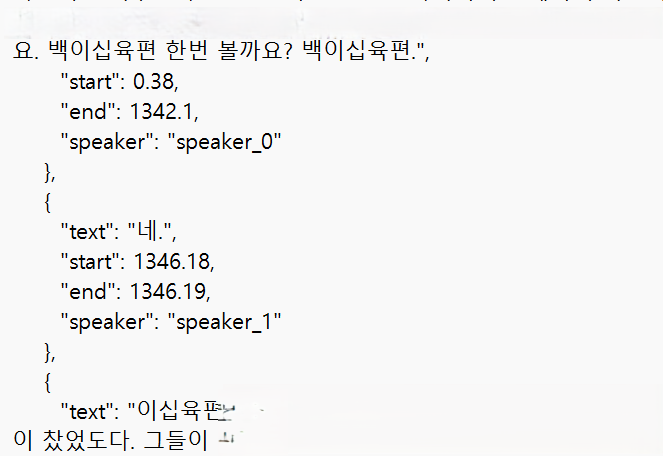
The result looks like the cover image above. Instead of one big wall of text, each line is tagged with a speaker (speaker_0, speaker_1) and its start and end time — the teaching set apart from the prayers and questions around it.
Where the Answer Came From
By now you know the pattern in this series. I don’t discover these tools. My older brother mentions them at the family farm, I write the name down, and months later I pull it off the shelf when a problem fits.
This time the name was ElevenLabs, and the wait was shorter than usual — only a few months. My brother had built an autobiography project (it’s on his GitHub, called voice studio) that used ElevenLabs to make speech — text turned into a natural voice. When my wife asked for transcripts, I remembered that and thought: if a company is this good at turning text into speech, maybe it does the reverse too. It did. ElevenLabs started in voice-making and had since added speech-to-text, including speaker separation.
But I didn’t start with ElevenLabs. I started with the one I already knew.
Round 1: Whisper (The One I Already Had)
I wasn’t a total beginner here. A while back, building a translation app with a different AI assistant, I’d used OpenAI’s Whisper for speech-to-text. So when transcripts came up, Whisper was my first stop — familiar ground.
Whisper is genuinely good at the main job. It turns speech into accurate text. With one clear speaker, it’s excellent.
Two problems for my recordings:
- It doesn’t separate speakers. Whisper transcribes what is said, and does it well. But on its own, it doesn’t tell you who said it. For a single narrator that’s fine. For a room full of voices, you get that one big wall of text. Getting real speaker labels means bolting on extra tools, and the results weren’t what I needed.
- The cost added up. Running hundreds of hours through it, the bill climbed faster than I expected.
Whisper was where I started. It wasn’t where I finished.
Round 2: Naver CLOVA (Good at the Hard Part — But I Couldn’t Use It)
My brother had also mentioned a Korean option: Naver CLOVA. And on the thing I cared most about — speaker separation — CLOVA is strong. It does diarization well.
But he’d already hit a wall with it himself. The terms for using it were too strict for what we were doing. A strong tool, but the wrong fit. Sometimes something is excellent and still off the table, because the way you’re allowed to use it doesn’t match your project. I crossed it off, trusting his experience.
Round 3: ElevenLabs (Where I Finished)
Then I tried ElevenLabs on the same audio, and it did the two things the others couldn’t do together:
- It separated the speakers well. The diarization I needed — the part Whisper couldn’t do alone — ElevenLabs handled.
- It cost less. On my audio, it came out cheaper than Whisper had.
Better at the hard part, and cheaper. That’s not a combination you get often. It ended the search, and I ran everything through ElevenLabs.
What It Actually Cost
I want to be specific, because “I used an AI service” tells you nothing about the bill.
Transcribing the full library through ElevenLabs cost me about $110 (₩150,000) in API fees, all in. A one-time cost to turn hundreds of hours of spoken teaching into clean, searchable, speaker-separated text — text my wife can read and study, and that anyone using the app can search in a moment.
For a private, personal project, that felt fair. It’s the kind of thing that wasn’t really possible for a non-engineer to do at home a few years ago, at any price.
A Word on What I Transcribed
One honest note, because it matters. Everything I transcribed was our own copies of recordings, for our own private study. It lives inside a personal, password-protected app, not republished anywhere. If you do something like this, transcribe audio you made or legally hold, and keep it private. The technique is the point of this post; what you run through it is your responsibility.
Where This Goes Next
Clean, speaker-separated transcripts were the goal. But they opened up something I hadn’t fully expected: the ability to search every word. Type a phrase and find every place across hundreds of hours where the teacher said it. That turned a pile of audio into something closer to a library with an index — and it became the feature I use most.
The next post goes into exactly that: how the transcript search works, and why it changed how we use a wall of old recordings.
If you’re following along, please subscribe.
Key Takeaways
- Transcription is “solved” for one clear speaker — but real recordings often have many voices, and that’s where tools struggle.
- The missing piece is speaker diarization: labeling who is speaking, not just what is said.
- Whisper transcribes well but doesn’t separate speakers on its own.
- Naver CLOVA does diarization well, but its terms were too strict for my project.
- ElevenLabs separated speakers and cost less on my audio — about $110 to transcribe the whole library.
- Transcribe only audio you made or legally hold, and keep personal projects private.